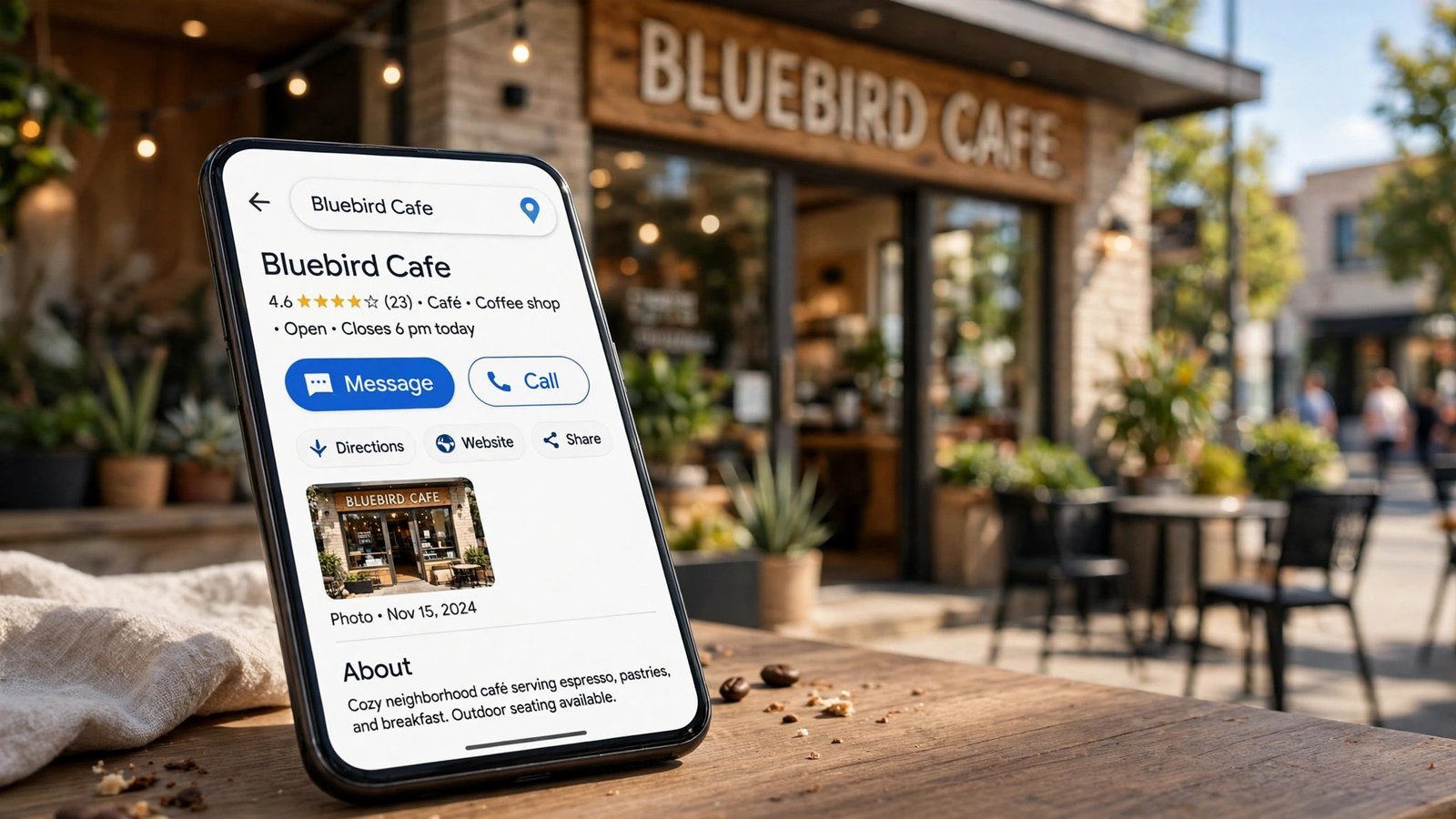
Google just moved the most important button on your business listing. On November 5, 2026, Google’s Lisa Landsman — Head of Industry Engagement and SMB Success — posted the monthly Small Business Bulletin, and the headline change is simple: customers on Google Maps now see a Message button right next to Call on your listing, on both Android and iOS. If your profile has chat set up, that button is now one of the first things a customer sees. If nobody answers it, it is also one of the first things a customer notices.
That’s the change that matters most, but it isn’t the only one. The same bulletin packs in Gemini access for Google Workspace accounts, photo and video uploads inside Gemini chats, a “Generate hours” tool that fills in opening hours from plain English, new controls for restaurants over third-party ordering links and menu labels, and a suspension-appeals tool that finally shows you the policy you supposedly broke. Around the same week, Google also started linking US home-service searches in AI Mode straight to booking pages, and published a new help page on managing offers on your profile.
None of this rewrites how local search ranks businesses. Relevance, distance, and prominence still decide who shows up in the map pack, and no November update changed that. What changed is how customers reach you once they find you — and how much of your profile an AI now reads, summarizes, and acts on. This piece walks through every confirmed change, flags the two where Google’s own pages contradict its announcement, and ends with a checklist you can finish before the Black Friday rush.
The November 2026 changes at a glance
| Change | Status | Who it affects |
|---|---|---|
| Message button next to Call on Maps | Confirmed, live | Profiles with chat set up (WhatsApp or SMS) |
| Gemini tools for Workspace accounts | Announced as “rolling out now” | Workspace businesses |
| Photo and video uploads via Gemini chat | Confirmed, live | Owners using the Gemini web app |
| “Generate hours” from plain language | Confirmed, live | All profiles |
| Turn off individual ordering providers | Confirmed, live | Restaurants |
| Gluten-Free, Dairy-Free, Halal, Kosher labels | Confirmed, live | Restaurants (Halal/Kosher: certified only) |
| Suspension appeals show policy, attach evidence | Confirmed, live | Anyone appealing |
| Manage offers help page | Confirmed, live (Nov 6) | Profiles with third-party offers |
| AI Mode booking links for US home services | Confirmed, live (Nov 4) | Home-service businesses in the US |
| AI-powered messaging agent | Limited pilot, invite-only | Some businesses |
| Facebook Messenger as a chat option | Confirmed (Nov 16) | Profiles with chat set up |
“Confirmed” means Google said it in a help page, its Small Business Bulletin, or a post by a Google staff member.
The Message button is now next to Call — and your inbox is on display
Before November, finding chat on a Google Maps listing meant scrolling deep into the profile. Now, as Landsman’s bulletin puts it, “whether a customer views your profile, opens the expanded header, or uses the bottom action bar, messaging is front and center.”
Tapping it sends the customer to whatever chat option you set up. Google’s chat help page gives you two choices: WhatsApp or text message. If you set up both, customers only see the text option — so pick the channel you actually answer. Chat is also only available in select regions, and Google doesn’t publish the list, so if the button doesn’t appear on your listing, region is the first thing to suspect, not a settings mistake.
This is the change with the most immediate downside if you ignore it. A dead link or an unread inbox used to sit buried in your profile. Now it sits in one of the top buttons a customer sees when they open your listing. Check today which messaging channel is linked in your profile and make sure someone actually answers it — a prominent button nobody responds to is a lost lead, and possibly a lost customer who now assumes you don’t reply at all.
A few details worth knowing before you turn chat on:
- Setup can ask for paperwork. Some owners setting up messaging in late October were asked for an EIN and a privacy-policy link, with a partner review taking a few working days (Search Engine Roundtable, October 28). Start now if you need messaging live before Black Friday.
- Facebook Messenger is now a chat option too. On November 16, Search Engine Roundtable reported that Google lets you add a Facebook Messenger account under the chat options. If your customers already message you on Facebook, this is the lowest-friction channel to offer.
- This is messaging’s second act. Google shut down its original Business Profile chat on July 31, 2024 — it stopped taking new conversations on July 15, 2024. What returned is different: instead of a Google-hosted chat, you link your own WhatsApp or text number, and Google surfaces it. Don’t follow any guide written before late 2024 that describes the old in-profile chat; that feature is gone.
My take: if your customers ask “are you open?”, “do you have this in stock?”, or “can I book for Saturday?” — a restaurant, a salon, a repair shop, a clinic — turn chat on and staff it. If every inquiry is a 20-minute conversation that belongs on the phone, leave chat off. A missing Message button is neutral. A Message button that goes unanswered for two days is a small reputation wound, repeated on every listing view.
Gemini can now manage your profile — and Workspace accounts are (mostly) invited
Google’s AI assistant Gemini has managed Business Profiles by conversation since June 2026. You type a plain-English request — “closed Thanksgiving, open 7 to 3 on Black Friday” — and Gemini fills in the hours, drafts a post, or updates the profile. Until November, there was a catch that kept most real businesses out: you had to sign in with a personal Gmail account. A company running on Google Workspace couldn’t use its business email.
The November bulletin says that barrier is going. “Workspace account access (rolling out now): You can soon connect your verified business profile directly using your business email through Google Workspace,” the bulletin reads. “You will no longer need to switch back and forth to a personal Gmail account to use Gemini with your profile.”
Setup, per the bulletin: your Workspace admin enables Gemini app access in the Admin console, you open Gemini signed in with the Workspace account, and you type @Google Business Profile in the prompt bar and follow the authorization prompt.
Here’s the catch: Google’s own help page disagreed with its bulletin as of November 6. Search Engine Journal reported that the Gemini Business Profile help page still said owners need a personal Google account, and that “for now, this feature isn’t available if you sign in with a work or school Google Account.” A November 20 roundup confirmed the help page still said the same. The bulletin says “rolling out now”; the help page says not yet. Treat Workspace access as coming, not here — try it, and if it refuses, check again next week. Standing limits: the connection works only for someone who owns or manages a single verified Business Profile, and only through the Gemini web app.
What Gemini can do once you’re connected got better in the same bulletin. Photo and video uploads via chat are live. Attach photos or videos from your device or Google Photos directly in a Gemini conversation, and Gemini will add them to your profile or write and publish a post using them. For a small business owner who takes photos on their phone all day and never opens the Business Profile dashboard, this is the most useful Gemini feature yet — the dashboard was the bottleneck, and Gemini just removed it. Google isn’t the only AI assistant moving into business profiles, either: ChatGPT now lets small businesses claim a business profile of their own, so the same “keep your business facts accurate everywhere an AI reads them” rule applies on both platforms.
“Generate hours” writes your hours from a sentence
The smallest change in the bulletin might save the most time. The hours editor now has a “Generate hours” section: type your schedule in plain language — “closed for lunch 1 to 2:30, open late Fridays till 9” — and Google fills in the hours fields.
Holiday hours are where small businesses lose customers every year. The bulletin’s holiday checklist leads with it: set special holiday hours so customers never find locked doors, update your menu, services, or product catalog with seasonal offerings, and publish holiday offers with Google Posts — which you can now draft in Gemini.
Type the hours the way a customer would ask about them, then read what Google filled in before you save — plain-language parsing handles “open 10 to 9 on Black Friday” well and split shifts badly. The bulletin suggests the prompt format: “@Google Business Profile set our special hours for Black Friday: Open 10 AM to 9 PM.”
Restaurants: you can finally switch off ordering providers you never signed up with
This one arrived just before the bulletin, and for restaurants it’s the biggest control change of the year. On October 28, Landsman wrote on LinkedIn that restaurants can now turn off a specific third-party ordering provider straight from the Business Profile dashboard — no more submitting a removal request to the provider and waiting.
The control sits in the provider’s settings, with separate switches for pickup and delivery — a provider is fully hidden only when you turn it off for both. When asked which countries have the setting, a Google product manager replied “all.”
Why this matters: Google’s policy page for ordering partners says “All partner integrations are enabled by default.” Providers you never signed up with — or stopped working with years ago — could appear on your listing, taking orders and commission under your name. Before this change, the only remedy was asking the provider to remove the link, with up to 5 business days to do it. Now you flip the switch yourself, and you can turn a provider back on at any time.
If you run a restaurant, do this today:
- Open your Business Profile, go to Food ordering, and list every provider shown for pickup and delivery.
- Turn off any provider you don’t recognize or no longer work with — both switches if you want it gone entirely.
- Set your own ordering link (or your preferred provider) as the preferred option, separately for pickup and delivery.
- Check again after a week. Turning off a provider on Google controls what diners see on Google; it doesn’t change your agreement with that provider, so if one reappears, that’s a conversation with the provider, not with Google.
The same bulletin adds menu labels restaurants have been asking for: you can now tag dishes Gluten-Free and Dairy-Free, plus Halal and Kosher. Google’s guidance is explicit that Halal and Kosher should only be used where the dish is certified — and I’d take that seriously. A wrong dietary label isn’t just a bad-review risk; it can harm someone who trusted it.
Suspension appeals finally tell you what you did wrong
Getting a Business Profile suspended used to feel like a locked door with no note on it. The bulletin says the appeals tool now shows the violated policy upfront — and, per the November roundups, lets you attach supporting documents before you submit.
The detail that decides whether your appeal succeeds: you only get one shot per appeal. Gather your documents first — business license, utility bill, photos of signage, whatever proves the business is real and at that address — and upload the evidence with the appeal rather than filing bare and hoping.
Two related warnings. First, Google staff confirmed in October that review appeals are backed up, with no timeframe — and asked owners not to file the same appeal twice. If you’re waiting on one, keep a record and don’t resubmit; duplicates slow the queue you’re in. Second, Google published a new help page on November 6, “Manage offers on your Business Profile”: providers may only submit offers for businesses they have a signed agreement with, and if one adds an offer you didn’t approve, you can contact Business Profile support — once you make a request, the provider must remove it within 5 business days. The feature is only in select regions and languages, but if a mystery discount is sitting on your listing, this is the removal path.
AI Mode now links home-service searches to booking pages
On November 4, Google started linking US home-service searches in AI Mode straight to booking and quote pages through Angi, Thumbtack, Housecall Pro, and Jobber, with ServiceTitan coming later. If you’re a plumber, electrician, roofer, or cleaner, this decides whether an AI Mode answer ends at your competitors’ booking page or yours.
The action is straightforward and entirely outside Google: make sure your profiles on Angi, Thumbtack, Housecall Pro, or Jobber are claimed, current, and pointing at the right booking page — because AI Mode is now reading those profiles as the source of the booking link. A stale Thumbtack profile with last year’s phone number doesn’t just lose you a lead; it loses you the lead at the exact moment a customer asked Google for someone like you. Click the booking link the same way you’d check your own website’s contact page, and confirm it lands where you think it does.
The AI messaging pilot: Google’s AI may soon answer your customers
Separate from the Message button, Google is widening access to an AI agent that answers customer messages for you. Reports from late October show businesses receiving emails about “early access to the AI-powered messaging pilot.” Customers message from Search and Maps in their phone’s normal messaging app, and the AI agent answers routine questions — hours, delivery area, what’s on the menu — at no cost, handing harder questions back to you.
Treat this as early and unconfirmed for your business type until you see the invitation in your own profile. The agent answers from your profile details — your hours, services, menu, prices, and description — which is another reason to keep those fields accurate: the AI can only be as right as the profile it reads from. Early reports also note the agent works only for customers whose phone and mobile network support RCS messaging. If the invitation lands in your inbox, read what it promises before you accept; a free AI receptionist that gives wrong answers about your prices is worse than no receptionist at all.
Your before-Black-Friday checklist
Black Friday is November 27. Work through this in order — about an hour, mostly one-time setup:
- Check your Message button. Open your listing on Google Maps on your phone. Is there a Message button next to Call? If yes, tap it — where does it go, WhatsApp, text, or Messenger, and does someone answer that inbox? If not, either staff it or turn chat off before the holiday rush.
- Set holiday and special hours. Use “Generate hours” or type them in directly. Cover Thanksgiving Day, Black Friday, and Christmas week — and verify what Google filled in.
- Try Gemini with your Workspace account. Admin enables Gemini app access, then @Google Business Profile in the Gemini prompt bar. If it works, you’ve cut the dashboard out of your workflow. If it refuses, retry in a week — the help page still says personal accounts only.
- Upload one real photo through Gemini. Attach a photo from your phone in a Gemini chat and ask it to post it. If it works, that’s your fastest way to publish Google Posts.
- Restaurants: audit ordering providers. Turn off every provider you don’t work with, for both pickup and delivery, and set your preferred provider. Tag dietary labels only where they’re true — and for Halal and Kosher, only where certified.
- Check for offers you didn’t create. Search for your business and use the new Manage offers path to request removal of anything unauthorized.
- Home services: check your booking links. Open your Angi, Thumbtack, Housecall Pro, or Jobber profile and click the booking link AI Mode will now surface.
- Post a holiday offer. Use Google Posts — or Gemini — to publish your seasonal special.
What hasn’t changed (and why that matters)
After a month of announcements, it’s worth saying plainly: Google did not rewrite the local ranking rules in 2026. Relevance, distance, and prominence are still the three things Google names for how local results are decided. You can’t change distance. You work on relevance — the right category, accurate services, a profile and website that tell the same story — and prominence — a steady flow of real reviews and a real presence in your community.
The November changes are about surfaces, not foundations: how customers reach you, how much of your profile an AI reads out loud, and how hard Google comes down on anything that looks fake. Get the foundation right — correct category, honest hours, real photos, real reviews, a website that matches the listing — and then take the hour to do the checklist above. If the local SEO basics are new to you, our SEO for beginners guide covers the fundamentals that sit underneath all of this. That’s the whole job.
Frequently Asked Questions
Is the Message button on Google Maps new, or did it exist before?
It’s new in this form. Google’s original Business Profile chat stopped taking new conversations on July 15, 2024 and was switched off July 31, 2024. The November 5, 2026 bulletin announced messaging’s return as a prominent Message button next to Call on Maps, routing to WhatsApp or text — or Facebook Messenger, added November 16. The button only appears if you have a chat option set up, and chat is only available in select regions.
Can I use Gemini with my Business Profile if my business runs on Google Workspace?
Google’s November bulletin says Workspace access is “rolling out now,” but its Gemini help page still said — as of November 20 — that the feature isn’t available with a work or school Google account, and that you need a personal Google account. Try it: have your Workspace admin enable Gemini app access, then type @Google Business Profile in Gemini. If it refuses, the rollout hasn’t reached you yet. The connection also only works for someone who owns or manages a single verified profile, through the Gemini web app.
How do I turn off a third-party ordering provider on my restaurant’s profile?
Open your Business Profile, go to Food ordering, select the provider, and turn off “Show provider to customers” for pickup and for delivery. A provider is fully hidden only when both are off. You can turn it back on at any time, and set your own ordering link or a preferred provider separately for pickup and delivery. This control arrived in late October 2026; before it, you had to ask the provider to remove the link and wait up to 5 business days.
Can I label dishes Halal or Kosher on my Google Business Profile?
Yes — the menu editor now has Halal, Kosher, Gluten-Free, and Dairy-Free labels — but Google says Halal and Kosher should only be used where the dish is certified. Don’t use them to chase search traffic if your kitchen isn’t certified; a wrong dietary label can harm a customer who trusted it.
What should I do if my Business Profile gets suspended?
Prepare before you file: the tool now shows you the violated policy upfront and lets you attach supporting documents, and you generally get one shot at an appeal. Gather proof the business is real and at that address — business license, utility bill, photos of signage — and upload it with the appeal. Don’t file the same appeal twice; Google confirmed in October that review appeals are backed up.
Does any of this change how my business ranks on Google Maps?
No. Google still ranks local results on relevance, distance, and prominence, and none of the November updates changed those rules. What changed is conversion and visibility: customers can message you from the top of your listing, AI Mode can link home-service searches to your booking pages, and Gemini can manage your profile by conversation. Keep the foundation — accurate category, hours, photos, and real reviews — and treat the November changes as a checklist, not a new ranking strategy.
Sources: Google Small Business Bulletin, November 5, 2026; Search Engine Journal; Search Engine Roundtable; Google Business Profile help pages.