Midjourney launched Niji V8 on November 24, 2026, and for anime creators the headline is simple: your character can finally stay the same character from one scene to the next. The new model adds a dedicated Edit feature that takes a reference image of your character and carries their face, hair, and outfit into new poses and backgrounds. The catch is just as important: repeating the same prompt will no longer reliably give you the same character. Consistency now lives in the Edit feature, not in your prompt text.
What Niji V8 actually is
Niji is Midjourney’s anime-focused model line, built in collaboration with Spellbrush. It runs alongside the main Midjourney model — the default photo model is still V8.2, which has held that spot since July 24, 2026 — and it is tuned for anime and illustration styles rather than photorealism. Niji V8, also called Niji 8, is the first new Niji version since Niji 7 arrived in January 2026, so it has been nearly a year in the making.
Midjourney announced it on November 24, 2026, in a blog post on nijijourney.com titled “Welcome to Niji 8!” The post calls Niji V8 the “fastest and most coherent niji model yet.” Treat that speed claim the way it deserves: it is the vendor’s own wording, and Midjourney published no latency numbers, benchmarks, or test results to back it up. I have not tested Niji V8 hands-on, and I will say so plainly wherever it matters in this article rather than pretend otherwise.
The release has three headline changes: the Edit feature, better prompt following, and a deliberate shift toward variety — the same words now produce a wider range of characters, much like Niji 6 did. That last point is not a bug. It is the design, and it changes how every Niji 7 workflow needs to be rebuilt.
The Edit feature is the real release
Here is the problem Niji V8 solves. In Niji 6, creators had a character reference tool, known as cref, that let them hold a character steady across images. It vanished in Niji 7, and users have been asking for it back ever since. In Niji 7, the only way to keep a face was to repeat the same descriptive wording and hope the model landed on a similar face each time. That worked often enough to be usable and badly enough to be frustrating, especially across a ten-page comic or a 20-sticker set.
Niji V8 brings consistency back in a different form. Instead of a reference slot attached to a prompt, you edit a finished image. The workflow, straight from the announcement blog, is:
- Generate an image as normal in Niji V8.
- Press the quick edit button on the bottom-right corner of your finished generation.
- Attach more pictures — a character sheet and a background, for example — then describe the change in plain words.
The blog’s own example is the prompt pattern worth copying: “take the character from image 1 and put it into image 2, lying down.” The team says two images give the most control over quality and style, but one image is enough for small touchups. Their example of a one-image edit is adding a single hair bun to a character’s head.
One warning comes directly from the announcement, and it is worth taking seriously: the quality of the output depends heavily on the quality of the input. Blurry or pixelated reference images will give you blurry results. If you are building a character sheet to reuse across a whole project, make it clean and high-resolution first. A fuzzy phone photo of a sketch will not carry a character the way a crisp front-facing portrait will.
The Edit feature also connects to a wider shift inside Midjourney. The main model’s V8.2 release brought its own Edit Model, which replaced Omni Reference, Character Reference, and the Retexture tool, and it accepts up to four reference images. Niji V8’s edit feature is the anime line’s version of that same idea, and the announcement notes that style references (sref) and moodboards have also been improved in service of the same goal.
The Niji 7 habit you need to unlearn
This is the part that will trip up experienced Niji users, so let me put it plainly. In Niji 7, typing the same descriptive words tended to return a similar character. That was not a documented feature so much as a behavior creators learned to lean on. Niji 8 will not do this. The announcement blog says so directly: “Where Niji 7 excelled at ‘keep your character the same as long as you type in the same words’ Niji 8 will NOT do this. Instead, it will offer you a wide variety of options for the same words, much like Niji 6.”
The developers even joke about it. On every model release, they write, users arrive in the support channels saying their prompts stopped working — and the Niji team had the same experience themselves, typing in a saved character’s prompt and finding a different girl staring back. Their point is that variety and consistency pull in opposite directions: you want a tool that shows you a range of options before you know what you want, and then you want a tool that locks your choice in place once you have picked it. Niji 8 splits those two jobs apart. Generation is for exploring. The Edit feature is for preserving.
There is one nuance that softens the change. For this version, the team says it interprets prompt “length” as “intent”: longer prompts produce less diverse results than shorter ones, because a longer prompt signals that you have a stronger idea of what you want. But narrower is not the same as repeatable. Even a long prompt is not a reliable way to reproduce a character in Niji 8. If your project depends on the same face appearing ten times, the Edit feature is the mechanism, full stop.
What this means in practice: if you have a saved prompt library from Niji 7 that produced a consistent character by repetition, do not paste it into Niji 8 and expect the same results. You will get variety where you wanted sameness, and you will waste generations figuring out why. The migration is not hard, but it is real, and it starts with building one good reference image before you generate anything else.
The workflow: one character, three scenes
Let me walk through a concrete project, because the workflow only clicks once you see it end to end. Say you are making a three-scene comic strip about a traveler — a girl with short lime-green hair and blue eyes in a white shirt, the same character from Midjourney’s own Niji 8 demo.
Step 1: Explore with short prompts
Start in Niji 8 with short, loose prompts and generate several grids. Something like “anime screenshot, girl with short lime-green hair, white shirt, train station” is enough. You are not trying to lock anything yet. You are shopping for a face and a design you like. This is the exploration phase, and Niji 8’s variety is an advantage here — you will see more distinct characters per grid than Niji 7 gave you.
Step 2: Pick one hero and build a character sheet
Choose your favorite generation. Now generate a clean character sheet from it: a front-facing portrait, a three-quarter view, and a full-body shot, all against a plain background. This sheet is your project’s source of truth. Save it somewhere you can find it again, because every later scene will attach back to it.
This is also the moment to write down your character’s fixed traits in plain words — hair color and length, eye color, outfit, any accessory that must never change — and keep that description identical every time you use it. The reference image does most of the work, but a fixed text description helps the model hold details the image alone might drift on.
Step 3: Generate scene 1 with the Edit feature
Open your hero image and press the quick edit button on the bottom-right corner. Attach your character sheet as image 1 and a background reference as image 2 — say, an airport terminal or a train platform. Then describe the composition in plain words, naming each image by position: “take the character from image 1 and put her into image 2, standing at the departure board with a suitcase.” The two-image form is the one the Niji team recommends for maximum control over quality and style; one image alone works for small changes, but when the whole point is placing a character into a new world, give the model both pieces.
Step 4: Repeat the same pattern for scenes 2 and 3
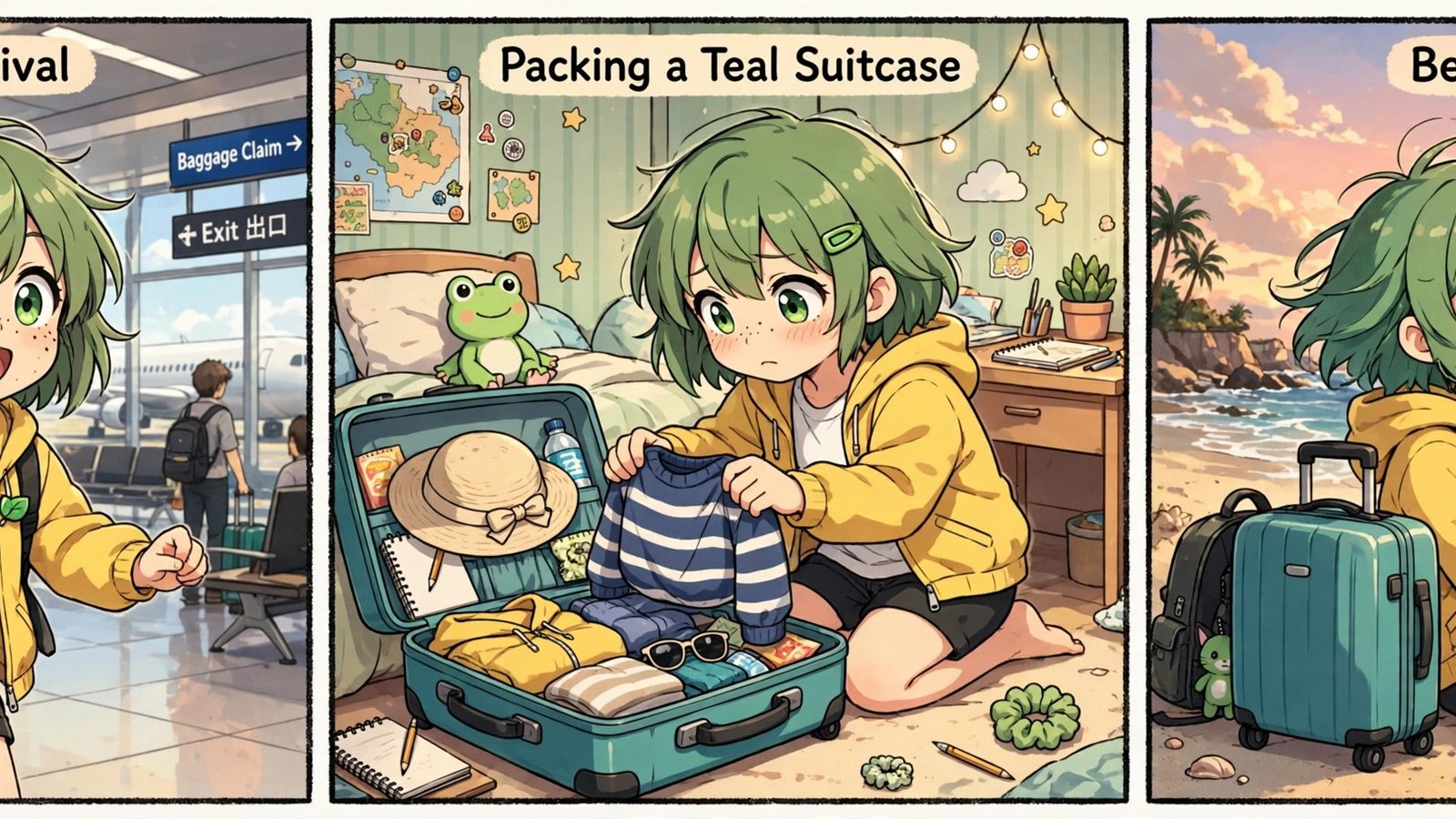
For each new scene, start from the same character sheet and the same fixed description, attach a new background, and change only the action and setting. Scene 2 could be the packing scene from the announcement demo: your character sitting on a bed, packing a white sundress into a teal suitcase, a pink flamingo inner tube in the background. Scene 3 could be the arrival: the same character on a beach at sunset, suitcase beside her. Because every scene starts from the same reference image rather than from a repeated prompt, the face, hair, and outfit carry over. That is the whole trick.
Step 5: Review against the hero before you publish
Before any panel goes into a comic or a sticker set, compare it side by side with your hero image at full size. Check the landmarks that drift first: eye shape and color, hair length and part, outfit colors, and any accessory. If a panel drifts, do not accept it and move on. Run the edit again from the character sheet, or make a small touchup edit on the panel itself — the same one-image edit the team demonstrates with the hair bun. A series is only as consistent as its weakest panel, and readers notice drift even when they cannot name it.## What goes in the reference vs what goes in the prompt
The split that works:| Put this in the reference image | Put this in the prompt text |
|—|—|
| The character’s face, hair, and outfit | The new pose or action |
| The character sheet or hero portrait | The new setting or background |
| The background photo or scene to place them in | The mood, lighting, and camera angle |
| Style cues the image already carries | Panel layout for comics (“top panel… middle panel… bottom panel…”) |
| Small details that must not change (accessory, color) | What is happening in this specific scene |
The rule of thumb is simple: the reference image answers “who is this and what do they look like,” and the prompt answers “what are they doing, and where.”
Better prompt following, and a comic page from one prompt
The second headline change is prompt following. With every Niji version, Midjourney says it improves how closely the model sticks to what you actually wrote, and Niji 8’s demo is a scene that would have challenged Niji 7: “anime screenshot, a woman with short, lime green hair, blue eyes, white shirt, sitting on a bed, packing a white sundress into a teal suitcase, pink flamingo inner tube in the background.” Every object in place, in one prompt.
Push that further and you get the trick the announcement is proudest of: a simple comic page from a single prompt. The example is a manga panel of a girl with short hair on a trip — top panel the airplane lands, middle panel the wheels on her suitcase, bottom panel she looks pleased, the airport in the background. One prompt, three panels, one character arc.
That is genuinely useful for creators, but keep the expectation honest. A single-prompt comic page gives you layout and story beats, not character consistency across a whole series. For a one-off page, the prompt alone may be enough. For a ten-page chapter, you still need the Edit feature to carry the same character from page to page.
There is also an independent early test worth knowing about, with its limits stated clearly. The site the9.pro ran a small comparison on November 25, 2026: four prompts, one four-image grid per prompt, personalization off. On a detailed multi-object scene — a girl with short silver hair and a red scarf at a wooden desk, a black cat on a stack of books, a blue mug, a rainy city outside — Niji 8 placed all three prompted layout details correctly in 4 out of 4 images, against 2 out of 4 for both Niji 7 and Midjourney V8.2.
Niji 8 vs Niji 7 vs Midjourney V8.2: which one for your project
Not every anime project should move to Niji 8 on day one. Start new character-driven projects in Niji 8, and finish existing Niji 7 series in Niji 7:
| Project | Best model | Why |
|---|---|---|
| A comic, manga, or sticker set with one recurring character | Niji 8 | The Edit feature is the only reliable way to carry a face across scenes |
| One-off anime illustrations or posters | Niji 8 | Better prompt following and more variety to choose from |
| Exploring character designs before committing | Niji 8 | Short prompts return a wider range of characters to pick from |
| A finished Niji 7 series that must match existing panels | Niji 7 | Niji 8 will not reproduce your Niji 7 character from the same words |
| Photorealistic or non-anime work | Midjourney V8.2 | Niji is tuned for anime and illustration, not photos |
| A project already mid-series in Niji 7 with a working prompt library | Niji 7 (finish it), then Niji 8 | Switching mid-series means rebuilding your character as a reference image |
The practical takeaway: start new character-driven projects in Niji 8, and finish existing Niji 7 series in Niji 7.
How to turn it on, and what it costs
Access is straightforward, and there is no new pricing. In Discord, type --niji 8 after your prompt. In the web app, select “Niji 8” from the Version dropdown — click the settings icon to the right of the prompt bar. It also runs on nijijourney.com. Niji V8 sits under the standard Midjourney subscription, which starts at $10 a month for the Basic plan, or $96 a year on annual billing. There is no free tier, and no API has been announced for Niji V8.
One more practical note: the Niji blog embeds a launch video on the announcement page, and it is worth a watch before your first session — it shows the edit workflow in motion. You can find it on the Niji 8 announcement blog, which also carries the full text of everything I have quoted here.
If you already use Midjourney’s main models, the Niji 8 edit workflow will feel familiar — the V8.2 Edit Model works the same way — and the skills transfer. For a fuller picture of how image editing has evolved, our guide to ChatGPT Images 2.5 and precise editing covers the competing approach, and Canva’s Craft image model shows how another major platform is tackling the same control problem. And if your anime character is destined for video thumbnails, our AI thumbnail maker guide for YouTube covers turning a consistent character into click-worthy art.
The honest box: what we do not know yet
First, speed. Midjourney calls Niji 8 its fastest Niji model yet and praises the HD feature’s speed, but it published no latency figures, no generation-time comparisons, and no benchmarks of any kind. Until independent testers time real generations, “fastest yet” is a claim, not a fact. Do not plan a production schedule around it.
Second, consistency quality. The Edit feature is the mechanism, but how well it holds a character across ten scenes, outfit changes, and extreme angles is something only sustained use will show. The announcement’s examples are favorable cases — a character placed into a background, a small accessory added. Real projects will push harder, so expect drift and budget time for re-edits.
Third, my own testing. I have not run Niji 8 hands-on for this article, and I am not going to describe a side-by-side test I did not do. The real test of Midjourney Niji V8 anime character consistency is a three-scene comparison of the same character — same face, same outfit, three different settings — judged against the hero image.
Fourth, the independent numbers are thin. The only third-party test I found, from the9.pro, used four prompts and one grid each. Treat its 4-out-of-4 result as a signal, not proof.
None of this makes Niji 8 a bad bet. The Edit feature solves the exact problem anime creators have complained about since Niji 7 dropped cref, and the mechanism — reference images plus plain-language edits — is the same approach that already works in Midjourney’s main V8.2 model. But the honest version of this story is that the launch is two days old, the vendor’s claims are unmeasured, and the community’s verdict is still forming. I searched Reddit for early user reactions and found no dedicated thread yet — the conversation is still happening in Discord servers and on X, not in a form I can quote. That will change fast, and it is worth checking back.
What this means for creators who sell anime art
If you sell stickers, prints, commissions, or comic pages, Niji 8 changes the math on one specific cost: rework. In Niji 7, keeping a character consistent across a set meant regenerating until the face landed close enough, then accepting small differences or fixing them by hand. That is slow, and for a 20-sticker set it is the difference between a weekend project and a week of grinding.
With the Edit feature, the cost shifts to the front of the project. You spend your time once, building a sharp character sheet and a fixed description, and then each new scene starts from that sheet instead of from scratch. That is a better trade for anything with a recurring cast: a webcomic, a mascot, a VTuber character sheet, a sticker pack, a children’s picture book.
Frequently Asked Questions
Is Midjourney Niji V8 live now?
Yes. Midjourney announced Niji V8 on November 24, 2026, in the “Welcome to Niji 8!” post on nijijourney.com, and it is available now in the Midjourney web app, on nijijourney.com, and in Discord with the --niji 8 parameter. It is the first new Niji version since Niji 7 launched in January 2026.
How do I keep the same anime character across scenes in Niji V8?
Use the Edit feature, not repeated prompts. Generate your character, open the finished image, and press the quick edit button on the bottom-right corner. Attach your character sheet as image 1 and a background as image 2, then describe the composition in plain words — for example, “take the character from image 1 and put it into image 2, lying down.” Repeating the same prompt text will not reliably reproduce the same character in Niji 8, so the reference image is what holds the face, hair, and outfit steady.
What happened to character reference (cref) in Niji?
The cref tool existed in Niji 6 and disappeared in Niji 7, which left creators with no built-in way to hold a character steady. Niji V8 brings it back in a different form: instead of a reference slot attached to a prompt, you edit a finished image with reference images attached. The Niji team describes the Edit feature as the replacement for cref, and it accepts character sheets, individual character images, and background references.
How much does Niji V8 cost?
Niji V8 has no separate price. It runs under the standard Midjourney subscription, which starts at $10 a month for the Basic plan, or $96 a year with annual billing. There is no free tier. Midjourney has announced no pricing change alongside Niji V8, and no API has been announced either.
Can Niji V8 make a comic page from one prompt?
Yes, for simple layouts. The announcement demonstrates a three-panel manga page from a single prompt: top panel the airplane lands, middle panel the wheels on a suitcase, bottom panel the character looks pleased, with the airport in the background. That works for a one-off page. For a multi-page series with the same character throughout, you still need the Edit feature to carry the character from page to page.
Should I switch my existing Niji 7 project to Niji 8?
Finish an in-progress Niji 7 series in Niji 7. Niji 8 will not reproduce your Niji 7 character from the same prompt words, so switching mid-series means rebuilding your character as a reference image and re-matching every existing panel. Start your next character-driven project in Niji 8, where the Edit feature and better prompt following are worth the new workflow.