
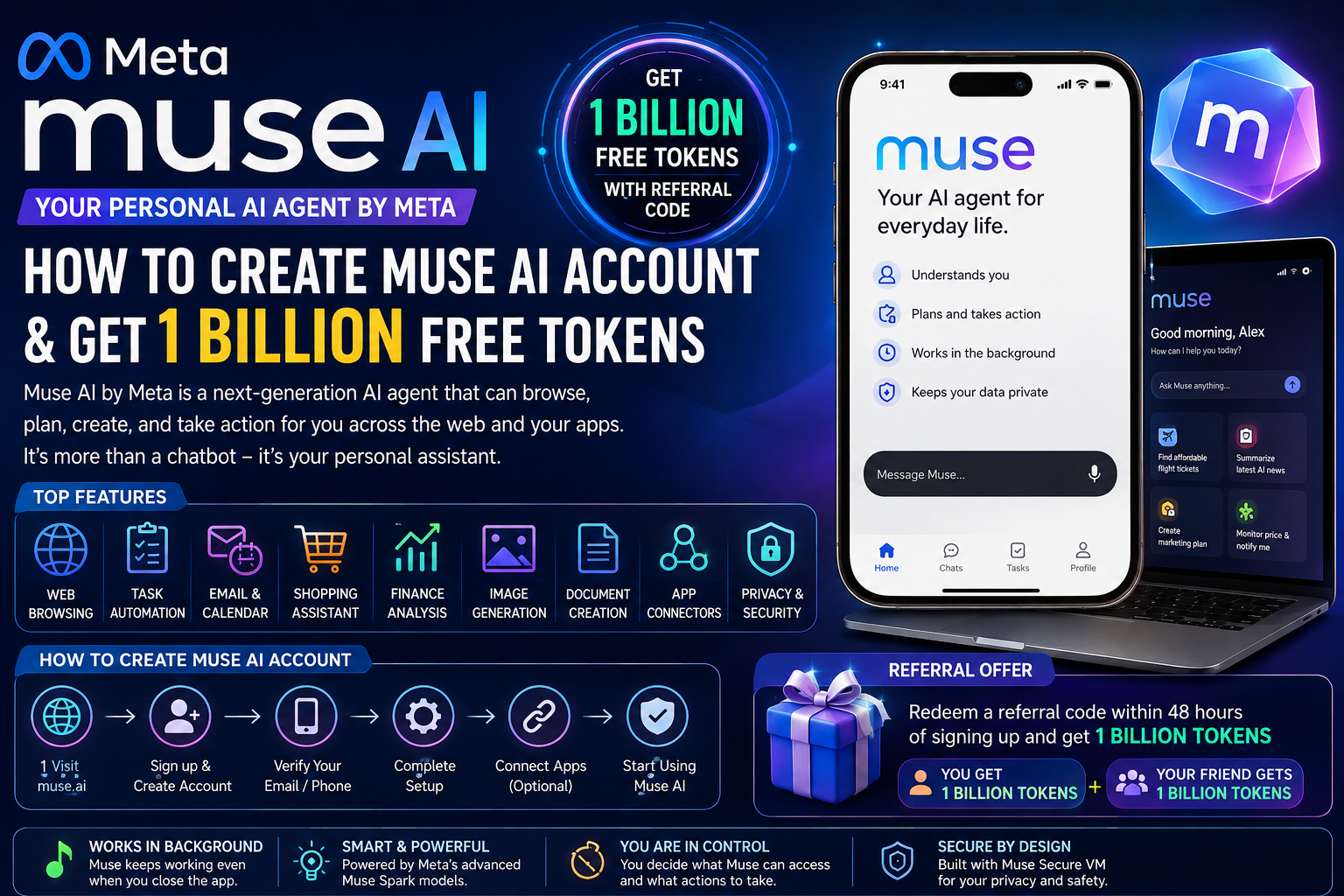
Meta has entered the AI agent race with Muse, a new personal AI agent designed to do more than simply answer questions. Unlike a traditional chatbot, Muse can browse the web, complete multi-step tasks, work with connected apps, create documents and images, monitor goals, and continue working in the background after you close the app.
One of the most interesting promotions currently associated with Muse is its referral program, which can give a new user and the referring user 1 billion Muse tokens when the referral requirements are met. The referral offer has attracted considerable attention because it provides a large amount of additional usage without immediately requiring a paid subscription.
Below, I’ll walk you through what Muse actually is, what it can do, how the referral tokens work, and how to set up an account if it’s available where you live.
What Is Muse AI?
Muse is Meta’s personal AI agent, built to perform actions on behalf of users rather than simply generate answers.
Meta describes Muse as an agent that can take a goal, develop an action plan, perform tasks, and continue working toward that goal with the user’s permission. It is powered by Meta’s Muse Spark model family and runs through a dedicated secure virtual computer called Muse Secure VM.
Here’s what separates Muse from a regular chatbot: it doesn’t just answer — it acts.
For example, instead of asking an AI:
“How can I find a cheaper flight?”
you can ask Muse to research flights, compare options, monitor prices and help complete the booking process, subject to your permissions and approval.
Meta says Muse can browse the web, make purchases, generate images, create documents, connect to apps, set reminders and track goals.
Is Muse Available in the USA?
Meta initially launched Muse with a U.S. rollout on iOS, Android and the web at muse.ai. Meta says the service is free for many everyday uses, with paid subscription options available for users who need more usage.
Availability can change as Meta expands Muse to additional markets.
Important Note About Using a USA IP
If Muse is not officially available in your country, you may see people recommending a VPN or USA IP address.
However, an IP address alone does not necessarily make an account eligible for a regional promotion. Services can use additional signals such as account information, device information, payment details and regional availability.
Therefore, do not assume that simply connecting through a USA IP guarantees access to Muse or the 1-billion-token promotion.
If Muse is officially available where you live, the safest approach is to create and use your account normally.
If you are physically in the U.S. and Muse is available to you, you can use the official Muse signup process.
How to Create a Muse AI Account
Follow these general steps:
Step 1: Visit the Official Muse Website
Go to the official Muse website:
Check out Muse, your personal AI agent. Redeem my code in Settings within 48 hours of joining and we’ll both get 1 billion Muse tokens.
Redeem This Code: TECVLY
https://muse.ai/join
You can also access Muse through Meta’s official Muse page.
Step 2: Create Your Account
Select the option to get started and follow the account creation process.
Use accurate account information and follow the signup instructions provided by Muse.
Step 3: Open Muse
After creating your account, access Muse through the web, mobile app or supported desktop application.
Meta currently provides Muse applications for iPhone, Android and Mac, in addition to its web experience.
Step 4: Complete Your Initial Setup
Muse allows you to connect services and applications that you want your agent to work with.
For example, you may connect services such as:
- Calendar
- Other supported applications
You decide what access Muse receives.
How to Get 1 Billion Free Muse Tokens
The 1-billion-token promotion is associated with Muse’s referral or invite-code system.
According to current reports about the referral program, a new user can redeem an invite code and receive 1 billion Muse tokens, while the person providing the code can also receive 1 billion tokens. The reported requirement is that the code must be redeemed within 48 hours of joining.
Step-by-Step Referral Process
- Create your Muse account.
- Open Muse.
- Go to Settings.
- Look for the Referral, Invite, or Redeem Invite Code option.
- Enter a valid referral/invite code.
- Complete the redemption within the required time window.
- Check your token balance.
Because Meta can change promotional terms, the exact wording and location of the referral option may change.
Get 1 Billion Free Tokens
If someone you trust shares a Muse referral link or code with you, you can redeem it during signup. Otherwise, check Meta’s official Muse page for current promotions before relying on any offer you see online.
What Are Muse Tokens?
Muse uses usage limits and token-based consumption for its AI capabilities.
The 1-billion-token referral offer should not be interpreted as 1 billion dollars of credit or unlimited lifetime access.
Tokens represent usage capacity within the Muse service. Different tasks can consume different amounts of computational resources.
For example, complex agentic tasks may require substantially more resources than a simple text conversation.
The practical benefit of receiving a large token allocation is that you can experiment with Muse’s more advanced capabilities without immediately reaching a usage limit.
Main Features of Muse AI
Muse is designed as a personal AI agent rather than a standard chatbot.
1. Web Browsing
Muse has its own browser inside its secure virtual environment.
It can navigate websites, research information, fill out forms and perform multi-step web tasks.
2. Personal AI Agent
Muse can remember relevant information and work toward long-term goals.
You can give Muse a goal, and it can create an action plan and continue working on tasks.
3. Background Tasks
One of Muse’s most interesting features is its ability to continue working after you close the app.
Meta says Muse can keep working in the background and return when something changes or when it needs your approval.
4. Email and Calendar
Muse can connect with supported applications and help manage everyday tasks.
For example, it can help organize information, prepare messages and coordinate schedules, subject to the permissions you provide.
5. Shopping
Muse can research products, compare prices, track prices, assist with purchases and help with returns.
Meta says Muse can use a one-time card number during eligible purchases so the user’s real card information is not exposed to the merchant or the agent.
6. Finance Assistance
Muse can help analyze financial information, create budgets and track financial goals.
Meta says supported bank connections can allow Muse to analyze spending patterns and create visual breakdowns.
7. Image Generation
Muse can generate images as part of its broader AI capabilities.
8. Document Creation
Muse can create documents and work on projects rather than simply providing short answers.
9. Connectors
Muse can connect with applications and services that you authorize.
Meta says that if a task requires a tool that does not already exist, Muse can build tools for itself to accomplish the task.
10. WhatsApp Integration
Muse is designed around conversational interaction and can be accessed through the Muse app and, in supported experiences, directly through WhatsApp.
Muse Secure VM
One of the technologies that makes Muse different is its Muse Secure VM.
A virtual machine provides Muse with a dedicated computer environment containing a browser and resources needed to perform tasks.
This allows Muse to operate websites and applications in a controlled environment.
Meta says users remain in control of the agent and can decide which services Muse can access.
Is Muse Safe?
Security is especially important when an AI agent can perform actions on your behalf.
Meta says Muse includes permission controls and an audit trail showing what the agent has done and what it plans to do.
Muse is also designed to request approval before sensitive actions such as sending an email or making a purchase.
Meta also says user credentials are stored in a secure credential system that Muse itself cannot read.
Users can control connected applications and disconnect services when they want.
Muse vs Traditional AI Chatbots
A traditional chatbot generally works like this:
You ask → AI answers → Conversation ends.
An AI agent works differently:
You give a goal → Agent creates a plan → Agent uses tools → Agent performs actions → Agent reports progress.
That’s the whole idea. Instead of using AI just for writing or answers, you hand it real tasks — and it goes and does them.
Who Should Use Muse?
Muse can be particularly useful for:
- Freelancers
- Digital marketers
- Entrepreneurs
- Researchers
- Students
- Content creators
- Online sellers
- Developers
- Business owners
- Social media managers
- People who perform repetitive online tasks
For example, a digital marketer could ask Muse to research competitors, organize information, prepare a report and create supporting documents.
A freelancer could use it for research, planning and administrative tasks.
An online seller could use Muse to compare prices, monitor products and assist with marketplace activities.
Is Muse Free?
Yes. Meta says Muse has a free usage tier with limits. When users reach the free usage limit, they can either wait for the limit to refresh or upgrade to a paid subscription.
The referral promotion can therefore be particularly attractive because a qualifying user may receive a large additional token allocation.
However, promotional terms can change, so always check the current information shown inside your Muse account.
Frequently Asked Questions
Is Muse made by Meta?
Yes. Muse is Meta’s personal AI agent and is part of Meta’s AI product ecosystem.
Can Muse browse the internet?
Yes. Muse has a browser inside its secure virtual machine and can navigate websites and perform multi-step web tasks.
Can Muse work after I close the app?
Yes. Meta says Muse can continue working in the background after you close the application.
How can I get 1 billion Muse tokens?
A current referral/invite promotion reportedly gives eligible new users 1 billion tokens when they redeem a valid invite code within the required time window.
Do I need a USA IP address?
Muse initially rolled out in the U.S., but an IP address alone does not guarantee eligibility. Regional availability and promotional eligibility can change. Use Muse according to Meta’s current regional requirements.
Can I use a VPN to create a Muse account?
A VPN may change your apparent IP location, but it does not guarantee eligibility and may conflict with a service’s regional requirements. It is better to use accurate account information and follow Muse’s official availability rules.
Is 1 billion tokens unlimited?
No. One billion tokens is a large usage allocation, but it should not be considered unlimited access or permanent free access to every Muse feature.
Can Muse make purchases?
Yes, Muse can assist with online purchases, but Meta says it asks for approval before sensitive actions such as purchases.
Does Muse work on Mac?
Yes. Meta provides a Muse Mac application, along with mobile apps for iPhone and Android.
Conclusion
Muse is Meta’s move from traditional AI assistants toward fully agentic AI.
Instead of simply answering questions, Muse is designed to browse the web, use connected applications, complete multi-step tasks, create documents and images, manage goals and continue working in the background.
The 1-billion-token referral promotion makes Muse especially interesting for people who want to test its agentic capabilities without immediately paying for additional usage. However, users should check the current referral rules, redemption deadline and regional eligibility because promotional terms can change.
If you are eligible, create your Muse account, open the referral section, redeem a valid invite code within the required period and verify that the additional tokens have been added to your account.
For the safest experience, always use the official Muse website and Meta’s official documentation rather than third-party websites claiming to sell Muse accounts or tokens.
Related reading: Facebook Monetization: From In-Stream Ads to Facebook Content Monetization
[…] Related reading: How to Create a Muse AI Account With a USA IP and Get 1 Billion Free Tokens […]
[…] one for 20 article topics in your niche, then check which have real search demand. This guide on how to create a Muse AI account with a USA IP and get 1 billion free tokens shows you how to set up a powerful free assistant for exactly […]